
Which Social Platforms Charge for Links Now? A 2026 Map
Instagram, Facebook Pages and LinkedIn charge for some links. Compare free link limits and paid options across eight platforms as of November 22, 2026.
As of November 22, 2026, three major social platforms put parts of outbound linking behind a paid subscription: Instagram, Facebook Pages, and LinkedIn. Five others (TikTok, X, Threads, Bluesky, and YouTube) charge nothing to place links, though several enforce follower minimums, disable clickable URLs in short-form captions, or make visitors switch browsers.
The table lists what you can post for free, what costs extra, and the rules to watch on each platform. Details were checked on November 22, 2026.
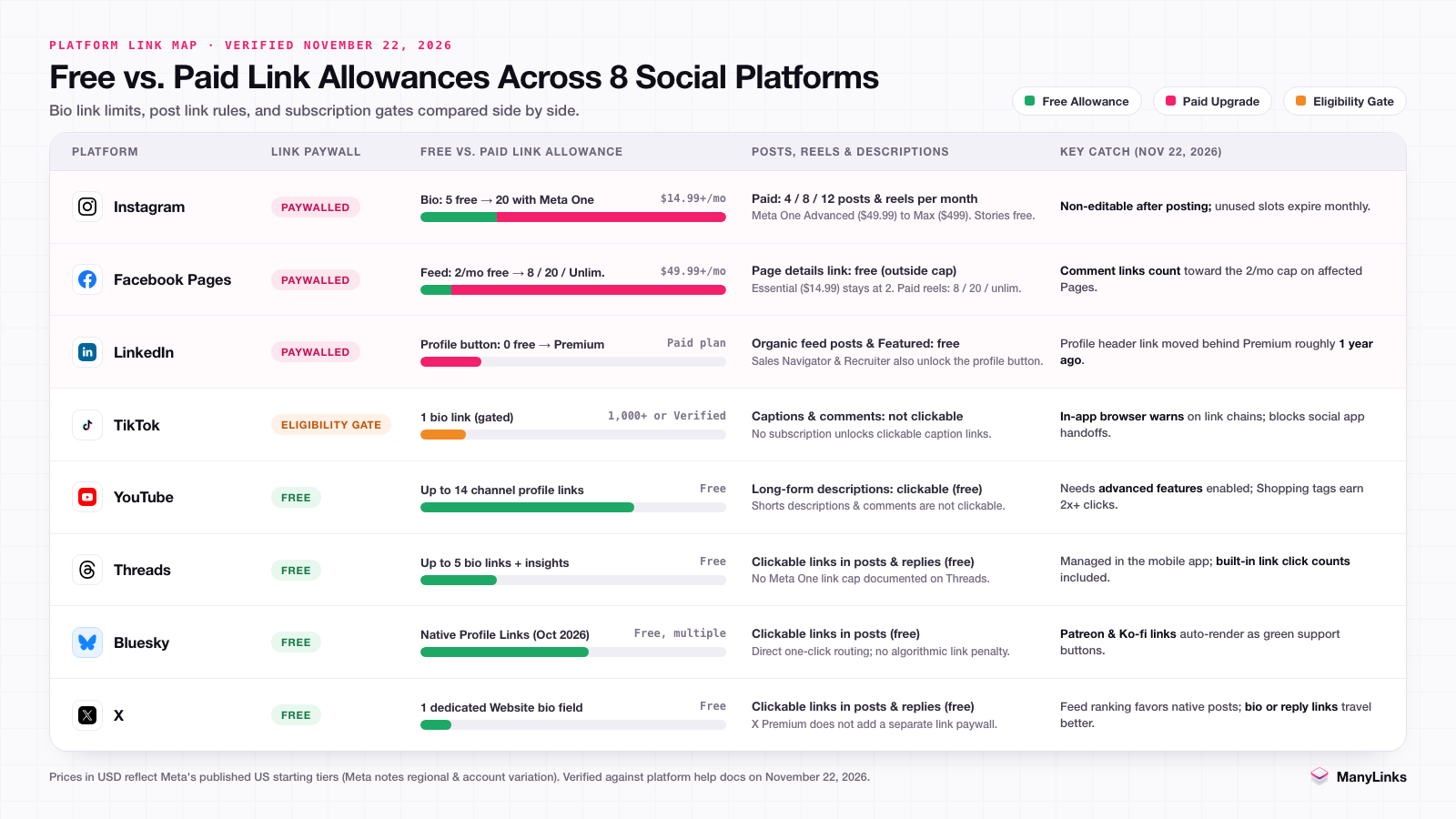
Master comparison matrix (November 22, 2026)
| Platform | Paywall? | Free profile links | Paid link upgrade | Post or description links | Key catch |
|---|---|---|---|---|---|
| Yes (Meta One) | Up to 5 bio links + Story stickers | 20-link bio page ($14.99+/mo); 4/8/12 post & reel links ($49.99 to $499/mo) | Paid only on feed posts & reels | Non-editable after posting | |
| Facebook Pages | Yes (Meta One) | Page details link; 2/mo feed cap on affected Pages | 8 / 20 / unlimited ($49.99 to $499.99/mo) | 2 free/mo on capped Pages | Comment links count toward cap |
| Yes (Premium) | None in profile header | Profile website button via Premium Business, Sales Navigator, or Recruiter | Free in feed posts & Featured | Roughly 1 year old | |
| TikTok | No (gated) | 1 bio link at 1,000+ followers or Verified Business | None for organic links | Captions & comments not clickable | In-app link-chain prompts |
| YouTube | No | Up to 14 Home tab links | None | Free in long-form descriptions | Shorts links not clickable |
| Threads | No | Up to 5 bio links + click insights | None | Clickable in posts & replies | Bio edited in mobile app |
| Bluesky | No | Native Profile Links (Oct 22, 2026) | None | Clickable in posts | Patreon/Ko-fi green buttons |
| X | No | 1 bio Website field | None required | Clickable in posts & replies | Feed favors native posts |
1. Instagram
Free: Up to 5 clickable bio links plus Story link stickers (excluding new accounts and repeat policy violators). Organic feed posts and reels carry zero free clickable links.
Paid (Meta One): Launched September 15, 2026, Meta One adds two paid options. Essential (starting at $14.99 per month in the US) and above unlock a native shareable link page holding up to 20 links with titles, images, and a primary link. Higher tiers sell separate monthly post and reel link allowances: Advanced ($49.99) gets 4 posts and 4 reels, Expert ($149 in Meta's announcement; $149.99 in Facebook's help center) gets 8 and 8, and Max ($499 or $499.99) gets 12 and 12. Essential includes none.
Rules and caveats: Post and reel links cannot be edited once shared, and unused slots expire on renewal. Links to Meta apps, catalog or affiliate products, and ads are exempt. Meta's own pages still conflict on rollout scope, citing global gradual rollout in the announcement and "limited testing" on its plans help page. Meta's link page help article lists no click analytics, UTM reports, custom domains, or link scheduling. See Instagram's native link page vs a link-in-bio tool and Instagram paid post links on Meta One.
Verdict: Keep your free bio link as your primary hub. If you buy Meta One post links, point them at an editable address you control so finished campaigns never strand dead URLs.
2. Facebook Pages
Free: On affected Pages, accounts without a subscription (and Meta One Essential at $14.99 per month) get up to 2 organic posts or comments with external links per month, resetting on the 1st with no rollover. Your Page details Links field and action button sit outside the post-and-comment cap.
Paid (Meta One): Advanced ($49.99) raises the cap to 8 per month, Expert ($149.99) to 20, and Max ($499.99) to unlimited, resetting on your renewal date. Paid tiers also carry separate Facebook Reel allowances (8, 20, or unlimited).
Rules and caveats: Links posted in comments by your Page count toward the monthly quota, closing the "link in the first comment" workaround. Exempt links include extra comment links on a post that already has a link, Meta app links, Facebook affiliate partner links, and ads. Meta notes the cap does not apply to every Page; Press Gazette reported on October 7, 2026 that news publishers are understood to be excluded, while over-limit URLs render as plain non-clickable text. See more ways to work within the limit in our Facebook Page 2-link limit guide.
Verdict: Put an editable hub URL in Page details, reserve your two monthly link slots for major launches, and place follow-up URLs as comments on those two posts where extra links stay exempt.
3. LinkedIn
Free: LinkedIn removed free clickable profile header hyperlinks (formerly Creator Mode). Clickable links remain free in organic feed posts, comments, articles, and your Featured section.
Paid: A custom website button in the profile header requires LinkedIn Premium Business, Sales Navigator, or Recruiter.
Rules and caveats: Checked on November 22, 2026, LinkedIn's help article still shows "Last updated: 1 year ago." That dates the paywall to roughly a year earlier.
Verdict: If you only need a profile link, pin your hub page in Featured for free.
4. TikTok
Free: TikTok charges nothing for its bio link, yet enforces an eligibility gate: 1,000 followers or a Verified Business Account (toggling to an unverified Business Account does not qualify). Caption and comment URLs are not clickable.
Paid: No consumer subscription removes the eligibility gate or makes organic captions clickable (paid ads and TikTok Shop anchors run separately).
Rules and caveats: TikTok's help center documents safety measures limiting external link chains in its in-app browser (prompting visitors to switch to their phone browser) and notes that TikTok no longer supports links that open or log users into other social apps.
Verdict: Put your most important link at the top of your bio page, then open it from the TikTok app to check where visitors land.
5. YouTube
Free: Channels can list up to 14 clickable links on their Home tab profile (with the first shown near the Subscribe button) plus clickable links in long-form video descriptions once advanced features are enabled.
Paid: None.
Rules and caveats: Clickable links in YouTube Shorts descriptions and comments have been disabled since August 2023; creators connect Shorts using Related Video links in Studio. On September 23, 2026, YouTube reported that shopping tags earn more than twice the clicks of description links across its 1.3M+ affiliate creators.
Verdict: Use description links for video-specific sources and keep one portable hub URL as your first channel link so Shorts viewers have a clean path off YouTube.
6. Threads
Free: Up to 5 clickable bio links (expanded in May 2025 with built-in click insights) plus clickable links in posts and replies.
Paid: None documented as of November 22, 2026.
Rules and caveats: Edit your bio links in the mobile app. Threads shows its link click data inside the app.
Verdict: Place your main hub link first in your Threads bio and reserve the remaining slots for timely campaigns.
7. Bluesky
Free: Clickable post links at no cost, plus native Profile Links launched October 22, 2026 directly beneath the bio with custom titles, drag-and-drop ordering, and direct one-click routing.
Paid: None.
Rules and caveats: Bluesky does not penalize outbound links in feeds, and links to Patreon or Ko-fi automatically render as prominent green support buttons.
Verdict: Add your key destinations directly to Bluesky's Profile Links and include your hub URL if you want cross-platform click tracking.
8. X
Free: One clickable Website field in your bio plus clickable links inside posts and replies.
Paid: X Premium includes longer posts, verification, and creator monetization features. Basic outbound links are free.
Rules and caveats: X's ranking algorithm has historically favored native content over raw outbound link posts, so sharing the core takeaway natively and linking in your bio or a reply remains standard practice.
Verdict: Point X's single Website field at one editable hub page so you never rewrite your bio for every launch.
One portable hub across all eight platforms
Paying per network for basic link slots splits your audience and locks your URLs inside each app's rules. A simpler setup is placing one hub page on a custom domain you own, such as links.yourname.com, and reusing that address across Instagram, Facebook Page details, LinkedIn Featured, TikTok, YouTube, Threads, Bluesky, and X. Tag each profile link with UTM parameters so you can see how much traffic each platform sends before paying for Meta One or LinkedIn Premium.
On ManyLinks, the Free plan (€0) includes unlimited links and blocks, every block type (note that ManyLinks has no checkout or email form, and the Stripe block displays revenue metrics only), and 30 days of analytics. ManyLinks Pro (€10.82 per month or €99.99 per year, VAT included) adds a custom domain, branded short links, unlimited analytics history, UTM campaign reports, and scheduled or expiring blocks across every platform for less than Meta One's $14.99 starting tier. For Instagram setup steps, see how to add multiple links to your Instagram bio.